Baroclinic wave experiment by Polvani et al. (2004)
A method to perform a baroclinic wave experiment by Polvani et al. (2004) is described.
Overview
This experiment does not require additional data, such as SST data. Thus, the experiment is performed with the following 3 steps:
- Compliation of main program etc.
- Preparation of directory for experiments
- Preparation of initial condition
- Execution of experiments
Compliation of main program etc.
Move to the HS94 experimental directory and compile main program etc. to generate the executable files.
$ cd execsrc/p04                         (Move to P04 directory)
$ make all                               (Compie execution files)
Preparation of a directory for experiments
Running the executable will generate a large number of NetCDF files, so we recommend creating a directory for your experiments and placing your input and output files there. For example, to set up ./exp as your experiment directory, executre the following command to copy the configuration files for initial value generation and for the experiment.
$ mkdir exp ; cd exp
$ cp ../exp_setup_files/init_data_p04_T21L20.conf .
$ cp ../exp_setup_files/dcpam_p04_T21L20.conf .
Makeing initial data
Use `dcpam_init_data_p04` and `init_data_p04_T21L20.conf` to create the initialization file `init_T21L20.nc`.
$ ../dcpam_init_data_p04 -N=init_data_p04_T21L20.conf

*** MESSAGE [init_data] ***  Run: Initial data generation
*** MESSAGE [init_data] ***  -- version = $Name:  $$Id: exp-p04.rd,v 1.14 2014/07/07 14:50:00 yot Exp $
*** MESSAGE [namelist_util] ***  ----- Initialization Messages -----
*** MESSAGE [namelist_util] ***    MaxNmlArySize = 256
*** MESSAGE [namelist_util] ***  -- version = $Name:  $$Id: exp-p04.rd,v 1.14 2014/07/07 14:50:00 yot Exp $
*** MESSAGE [timeset] ***  NAMELIST group "timeset_nml" is loaded from "./conf/init_data_p04_T21L20.conf".
                      :
*** MESSAGE [initial_data] ***    QVapAvr = 0.
*** MESSAGE [initial_data] ***    Ueq     = 0.
*** MESSAGE [initial_data] ***
*** MESSAGE [initial_data] ***  -- version = $Name:  $$Id: exp-p04.rd,v 1.14 2014/07/07 14:50:00 yot Exp $
*** MESSAGE [HistoryClose] ***  "init_T21L20.nc" is closed

############## CPU TIME SUMMARY ################
others                 0.200000E-01
------------------------------------------------
       TOTAL TIME =    0.200000E-01
Execution of experiments
Using the NAMELIST file dcpam_hs94_T21L20.conf, run dcpam_main_p04 as follows.
$ ../dcpam_main_p04 -N=dcpam_p04_T21L20.conf | tee p04.log

*** MESSAGE [namelist_util] ***  ----- Initialization Messages -----
*** MESSAGE [namelist_util] ***    MaxNmlArySize = 256
*** MESSAGE [namelist_util] ***  -- version = $Name:  $$Id: exp-p04.rd,v 1.14 2014/07/07 14:50:00 yot Exp $
*** MESSAGE [dcpam_main] ***  NAMELIST group "dcpam_main_nml" is loaded from "./conf/dcpam_p04_T21L20.conf".
&DCPAM_MAIN_NML FLAGDYNAMICS=T,FLAGFULLPHYSICS=F,FLAGHS94=F,FLAGVENUSSIMPLE=F,FLAGJUPITERSIMPLE=F,FLAGRADIATIONDENNOUAGCM=T,FLAGRADIATIONDCPAMEV1=F,FLAGRADIATIONDCPAMMV1=F,FLAGRADIATIONSL09=F,FLAGPHYIMP1LAYMODEL=T,FLAGPHYIMPSOILMODEL=F,FLAGPHYIMPSOILMODELSO=F,FLAGPHYIMPATMONLY=F,FLAGVERTICALFILTER=F/
*** MESSAGE [dcpam_main] ***  FlagDynamics=<T>.
*** MESSAGE [dcpam_main] ***  FlagRadiationDennouAGCM=<T>.
                  :
*** MESSAGE [HistoryClose] ***  "TotEngy.nc" is closed
*** MESSAGE [HistoryClose] ***  "Enstro.nc" is closed

############## CPU TIME SUMMARY ################
surface_properties     0.904434E-07
dynamics_hspl_vas83    0.380824E+01
mass_fixer             0.132011E+00
check_prog_vars        0.360025E-01
timefilter_asselin19   0.760067E-01
others                 0.212009E+00
------------------------------------------------
       TOTAL TIME =    0.426427E+01
In this case, 12 days integration is performed. Resolution is T21L20 (Number of grid points of longitude, latitude is 64, 32, and number of vertical layer is 20). History data are output to 'U.nc' and 'Temp.nc' etc., and a restart data is output to 'restart.nc'.
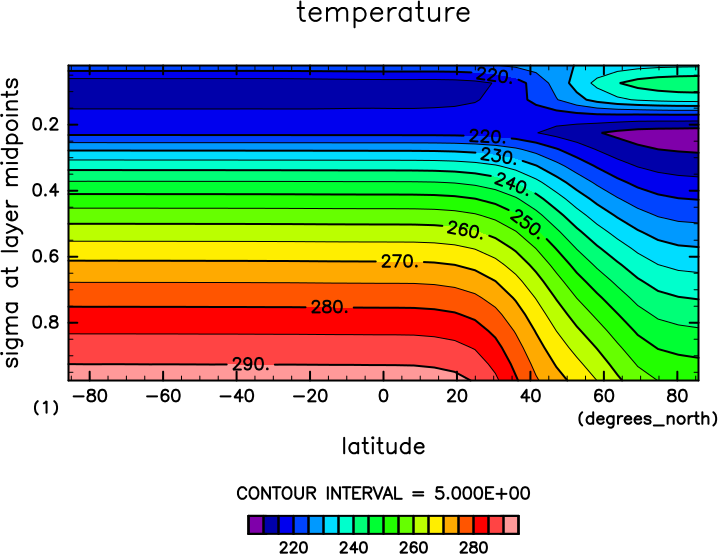
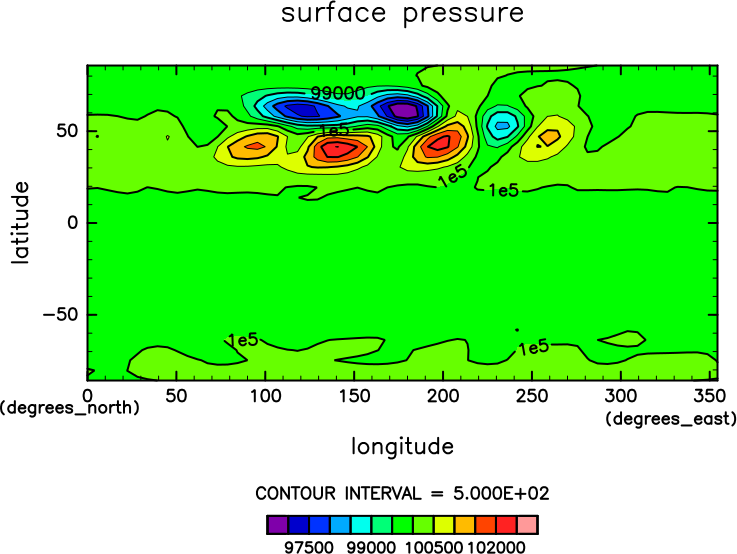
The east-west average temperature distribution 10 days later is shown in the figures below. These figures were created using the `gpview` command, which is included in the GPhys package, as shown below.
$ gpview Temp.nc@Temp,time=12 --mean lon --int 5 --noannotate
$ gpview Ps.nc@Ps,time=12 --int 500 --noannotate
For more detailed information on analysis and visualization, please refer to here.
Saving data
If you would like to keep the results of the numerical experiment, please create a sub directory ("data01" for example), move the files, and keep the current directory neatly.
$ mkdir data01
$ mv *.conf *.nc *.log data01/
You can output the results of the numerical experimet concurrently with the execution. Please refer to "Change output settings" in Change experimental setup and try to configure "FilePrefix" variable in NAMELIST ">ool_historyauto_nml".